| 일 | 월 | 화 | 수 | 목 | 금 | 토 |
|---|---|---|---|---|---|---|
| 1 | 2 | 3 | 4 | 5 | 6 | 7 |
| 8 | 9 | 10 | 11 | 12 | 13 | 14 |
| 15 | 16 | 17 | 18 | 19 | 20 | 21 |
| 22 | 23 | 24 | 25 | 26 | 27 | 28 |
| 29 | 30 | 31 |
Tags
- App.vue
- reactivity
- localStorage
- Vue.js
- Server
- Refactoring
- golang
- todo-list
- URL
- Vue
- cli
- websocket
- container
- emit
- goroutines
- TODO
- map
- Dictionary
- graceful shutdown
- component
- SFC
- go
- method
- PROPS
- Matrix
- 행렬
- channel
- goroutine
- CDN
- toggle
Archives
- Today
- Total
ksundev 님의 블로그
[TODO App] 각 컴포넌트 CSS 꾸미기 본문
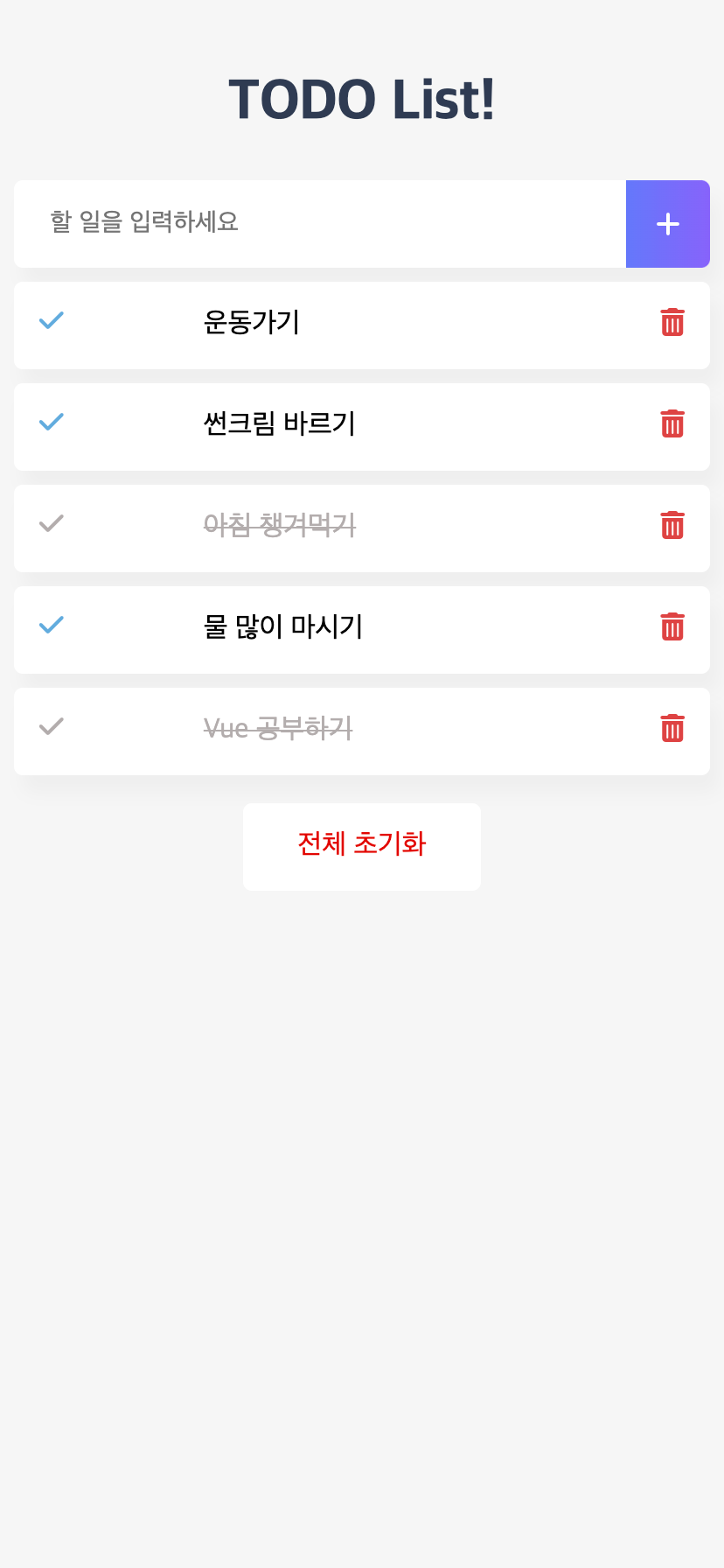
저희의 목표인 이 앱을 만들기 위해선 기능도 중요하지만 어느 정도는 스타일링이 필요하겠죠?
각 컴포넌트별로 style을 작성해봅시다.
참고로 각 아이콘들은 Font Awesome의 아이콘을 활용하였습니다. (자세한건 찾아보기)
<i class="~~"></i> 이 부분이 폰트아이콘 입니다.
# Header
<template>
  <div>
    <h1>TODO List!</h1>
  </div>
</template>

<style scoped>
h1 {
  color: #2f3b52;
  font-weight: 900;
  margin: 2.5rem 0 1.5rem;
}
</style>
앱 타이틀만 보여줄 컴포넌트라, JS 부분은 필요 없네요. 헤더는 이대로 완성입니다.
# Input
<template>
  <div class="inputBox shadow">
    <input
      type="text"
      placeholder="할 일을 입력하세요"
    />
    <span class="addContainer">
      <i class="fa-solid fa-plus addBtn"></i>
    </span>
  </div>
</template>

<script>
<!-- 추가 예정 -->
</script>

<style scoped>
input:focus {
  outline: none;
}
.inputBox {
  background: white;
  height: 50px;
  line-height: 50px;
  border-radius: 5px;
}
.inputBox input {
  border-style: none;
  font-size: 0.9rem;
  margin-left: 10px;
  width: 80%;
}
.addContainer {
  float: right;
  background: linear-gradient(to right, #6478fb, #8763fb);
  display: block;
  width: 3rem;
  border-radius: 0 5px 5px 0;
}
.addBtn {
  color: white;
  vertical-align: middle;
}
</style>
# List
<template>
  <div>
    <ul>
      <li class="shadow">
        <i
          class="checkBtn fa-solid fa-check"
        ></i>
        임시항목1
        <span class="removeBtn">
          <i class="fa-solid fa-trash-can"></i>
        </span>
      </li>
    </ul>
  </div>
</template>

<script>
<!-- 추가예정 -->
</script>

<style scoped>
ul {
  list-style-type: none;
  padding-left: 0px;
  margin-top: 0;
  text-align: left;
}
li {
  display: flex;
  min-height: 50px;
  height: 50px;
  line-height: 50px;
  margin: 0.5rem 0;
  padding: 0 0.9rem;
  border-radius: 5px;
  background: white;
}
.removeBtn {
  margin-left: auto;
  color: #de4343;
}
.checkBtn {
  line-height: 45px;
  color: #62acde;
  margin-right: 5rem;
}
.checkBtnCompleted {
  color: #b3adad;
}
.textCompleted {
  text-decoration: line-through;
  color: #b3adad;
}
</style>
# Footer
<template>
  <div class="clearAllContainer">
    <span class="clearAllBtn">전체 초기화</span>
  </div>
</template>

<script>
<!-- 추가예정 -->
</script>

<style scoped>
.clearAllContainer {
  width: 8.5rem;
  height: 50px;
  line-height: 50px;
  background-color: white;
  border-radius: 5px;
  margin: 0 auto;
}
.clearAllBtn {
  color: #e20303;
  display: block;
}
</style>
이번 포스트는 여기까지입니다.
스타일을 완성했으니 다음 포스트에서 Vue를 통해 기능을 추가해봅시다!
'[개발] Vue.js > 중급' 카테고리의 다른 글
| [TODO App] 동적 앱 만들기 (TodoFooter.vue) (0) | 2025.07.06 |
|---|---|
| [TODO App] 동적 앱 만들기 (TodoList.vue) (0) | 2025.07.06 |
| [TODO App] 동적 앱 만들기 (TodoInput.vue) (2) | 2025.07.06 |
| [TODO App] 프로젝트 생성 및 앱 구조 설계 (2) | 2025.07.02 |
| Vue 프로젝트 설정 방법 비교: 수동 Webpack vs Vue CLI (1) | 2025.07.02 |
'[개발] Vue.js/중급' Related Articles
more
